
Frequently Asked Questions
- I forgot my password…
- I forgot my username…
- How do I post pictures?
- How do I remove suggested videos on Youtube?
Kody: I forgot my password…
Don’t forget your password.
Kody: I forgot my username…
Don’t forget your username.
Kody: How do I post pictures?
Basic:
When creating a new post or page, there should be a button above the text box that looks like this: Clicking on the ‘Add Media’ button will bring up the blog’s media library. From here, you can select a previously uploaded picture, upload your own, or enter a url. To upload a picture from your computer, select the ‘Upload Files’ tab. From this tab you can drag and drop your picture into the library, or browse for your photo using the ‘Select Files’ button. After your picture is done uploading, you should see it in the media library. Make sure the thumbnail is selected, then press the blue ‘Insert into post’ button at the bottom.
Advanced:
When your picture is selected in the media library, you should see the following options on the bottom right of the screen: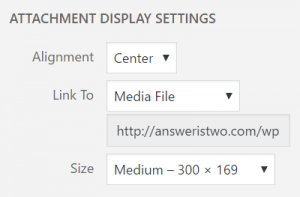 This determines the alignment of the picture on the page, what happens when it’s clicked on, and how big it is. The above settings offer a good starting point for any uploaded picture. If you would like to set new defaults for these options, go to http://answeristwo.com/wp-admin/options.php. Search for ‘image_default_align’, ‘image_default_link_type’, or ‘image_default_size’ and enter the default value wanted. Then click ‘Save changes’ at the bottom.
Mom: How do I remove suggested naughty videos on Youtube?
… uhhhh…
Find the video you want to share on YouTube.com, and press the ‘Share’ button. Switch to the ‘Embed’ tab, then ‘show more’. You should see something like this: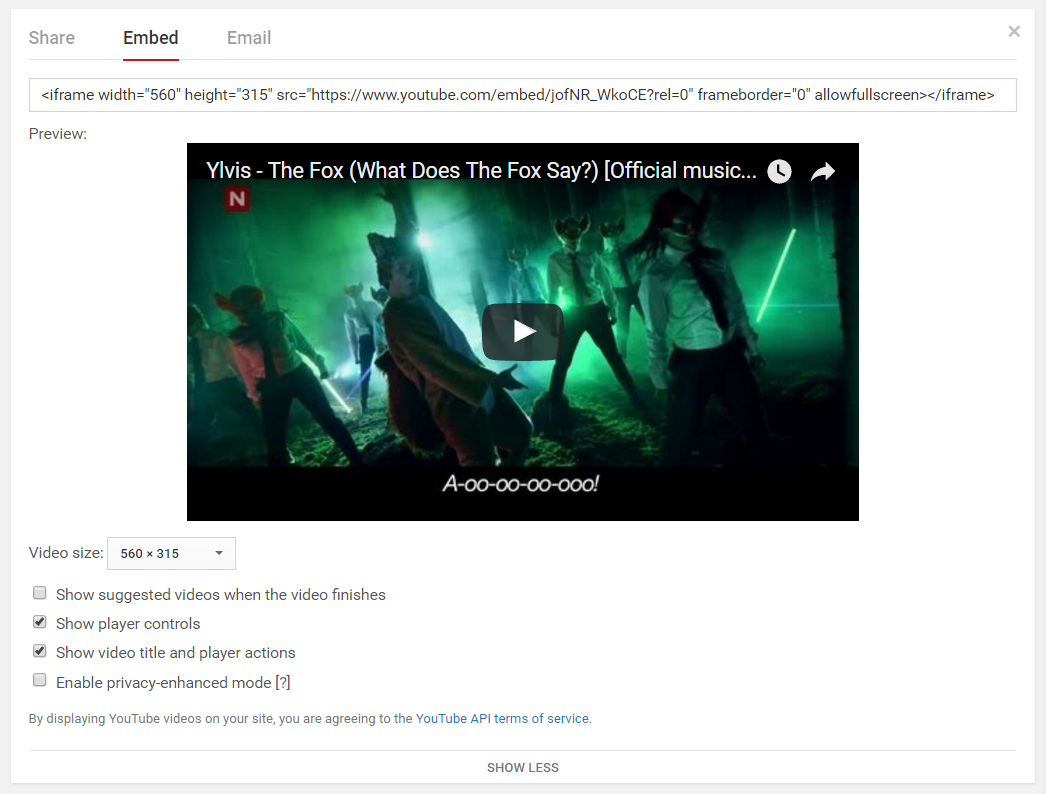 Deselect the ‘Show suggested videos when the video finishes’. Copy the url from above the movie thumbnail. In WordPress, paste the url where you want the video to appear. Make sure you are in the ‘Text’ tab vs the ‘Visual’ tab when pasting.